
If you have read about automation at work, you have probably seen the debate around RPA vs BPA. Both promise to save time and cut manual work, and both use the word “process automation”, so they are easy to mix up. But they are not the same thing, and choosing the wrong one can waste money and months of effort.
In this guide we explain RPA vs BPA in simple words: what each one means, the key differences, real examples, the most popular tools in 2026, and how to decide which one your business, office or team actually needs.
RPA vs BPA: The Short Answer
RPA (Robotic Process Automation) automates individual, repetitive tasks by using software “bots” that copy what a human does on a computer: clicking, typing, copying and pasting data between screens.
BPA (Business Process Automation) automates a complete business process from start to finish, often by connecting systems directly and redesigning the workflow itself.
A popular way to remember the RPA vs BPA difference: BPA is the director of a film, and RPA bots are the actors who perform individual scenes. RPA can be one of the tools inside a bigger BPA strategy.
What Is RPA (Robotic Process Automation)?
RPA is software that works on the user interface, the same screens a person sees. You “teach” a bot the steps of a task, and it repeats them quickly and without typing mistakes. There are no physical robots involved; the “robot” is a program running on a computer or server.
RPA comes in three main types:
- Attended RPA: the bot runs on an employee’s computer and helps them when they start it, for example filling a form from an email.
- Unattended RPA: the bot runs on its own on a server, on a schedule or when triggered, with no human watching.
- Hybrid RPA: a mix of both, where bots hand work to humans and back.
RPA works best for tasks that are high volume, rule-based and stable, such as copying invoice data into accounting software, downloading daily reports, or updating records in an old system that has no API.
What Is BPA (Business Process Automation)?
BPA looks at the whole workflow, not just one step. Before automating, teams usually map the process, remove unnecessary steps and then connect the systems involved (CRM, ERP, HR software, email, forms) so data flows automatically from one stage to the next. Approvals, notifications and reports become part of one automated flow.
For example, BPA might automate the entire customer onboarding process: the customer fills in an online form, the data goes into the CRM, a contract is generated, a manager approves it, and a welcome email goes out, all without anyone copying data by hand. If you are new to the topic, read our beginner guide: What Is Business Process Automation?
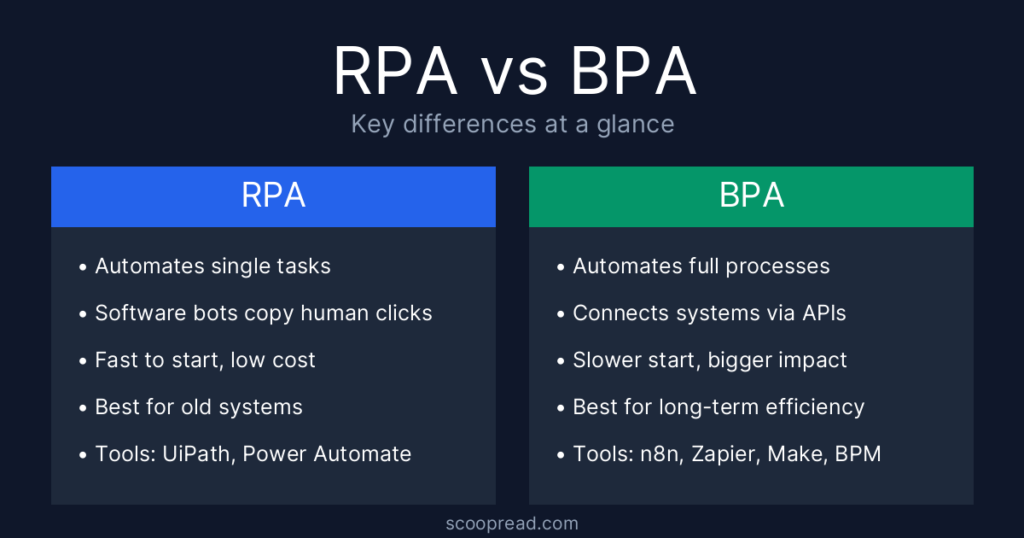
RPA vs BPA: Key Differences at a Glance
| Factor | RPA | BPA |
|---|---|---|
| Scope | Single tasks | End-to-end processes |
| How it works | Copies human actions on the screen | Connects systems through APIs and workflow engines |
| Process change | Automates the process as it is | Often redesigns the process first |
| Speed to start | Fast, often days or weeks | Slower, often months |
| Upfront cost | Usually lower | Usually higher |
| Maintenance | Bots can break when screens change | More stable once integrations are built |
| Best for | Legacy systems, quick wins | Long-term, company-wide efficiency |
| Typical tools | UiPath, Power Automate Desktop, Automation Anywhere | Workflow and integration platforms, BPM suites, n8n, Zapier, Make |
The biggest point in the RPA vs BPA comparison is scope. RPA makes one step faster. BPA makes the whole journey smarter.
RPA vs BPA Examples from Real Work
1. Invoice processing
RPA: a bot opens each PDF invoice in an inbox, reads the amount and vendor name, and types them into the accounting software.
BPA: invoices arrive through a supplier portal, are matched automatically with purchase orders, routed to the right manager for approval, and scheduled for payment.
2. Employee onboarding
RPA: a bot creates the new employee’s accounts in three different internal systems.
BPA: one form starts everything: contract signing, IT equipment request, account creation, payroll setup and a first-week schedule.
3. University admissions
RPA: a bot downloads application files from a portal and saves them into student folders.
BPA: applications are checked for missing documents, scored, sent to reviewers, and applicants get automatic status updates and offer letters.
These RPA vs BPA examples show the pattern: RPA speeds up a task inside the process, while BPA changes how the process runs.
RPA vs BPA: Pros and Cons
RPA pros
- Quick to set up and shows results fast
- Works with old software that has no API
- No need to change existing systems
- Very accurate for repetitive data entry
RPA cons
- Bots break when a website or screen layout changes
- Automates a bad process instead of fixing it
- Many separate bots can become hard to manage
BPA pros
- Improves the whole workflow, not just one step
- More stable because systems talk to each other directly
- Gives better tracking, reporting and control
- Scales as the business grows
BPA cons
- Takes longer to plan and build
- Higher upfront cost and more IT involvement
- Needs people to agree on changing how they work
RPA vs BPA: Which One Should You Choose?
The right answer to RPA vs BPA depends on your problem, not on which term sounds more modern.
Choose RPA when:
- You have a few repetitive, rule-based tasks eating hours every week
- Your systems are old and cannot be connected with APIs
- You need a quick win with a small budget
Choose BPA when:
- The whole process is slow, with delays between teams and approvals
- Your tools already offer APIs or built-in integrations
- You want long-term efficiency and clear visibility of every step
A simple rule: if the system has an API, connect it with BPA. If it does not, use an RPA bot to bridge the gap.
Can RPA and BPA Work Together?
Yes, and in practice most companies use both. The RPA vs BPA question is often not “one or the other” but “where does each fit”. A BPA workflow can run the full process, while an RPA bot handles the one step that involves an old desktop system.
When RPA and BPA are combined with AI, such as document reading, chat-based assistants and AI agents that make simple decisions, the result is often called intelligent automation or hyperautomation. In 2026 most major automation platforms are adding AI agent features so that bots can handle exceptions instead of just following fixed scripts.
Popular RPA and BPA Tools in 2026
- UiPath: one of the best-known RPA platforms, strong for complex automation across many systems.
- Microsoft Power Automate: combines cloud workflows (BPA) with desktop bots (Power Automate Desktop), and fits naturally into Microsoft 365.
- Automation Anywhere: cloud-based RPA with strong document processing features.
- Zapier and Make: no-code tools for connecting apps and automating simple business workflows.
- n8n: a flexible, developer-friendly workflow tool that can be self-hosted.
Tip for beginners and students: Power Automate Desktop is included with Windows 11 and UiPath offers a free Community Edition, so you can learn RPA without paying anything.
RPA vs BPA: Frequently Asked Questions
Is RPA a type of BPA?
In a way, yes. Many experts see RPA as one technology you can use to achieve BPA. Every RPA bot automates part of a business process, but BPA covers much more than bots.
Which is cheaper in the RPA vs BPA debate?
RPA is usually cheaper to start because it automates existing tasks without changing systems. BPA costs more upfront but can save more over time because it removes waste across the whole process.
What is the difference between BPA and BPM?
BPM (Business Process Management) is the wider discipline of designing, measuring and improving processes. BPA is the part that uses technology to run those processes automatically.
Is RPA a good career skill?
Yes. Companies in banking, telecom, healthcare and outsourcing hire RPA developers and analysts. Learning one RPA tool plus basic workflow automation gives you an advantage in both sides of the RPA vs BPA field.
Will AI replace RPA?
AI is changing RPA rather than replacing it. Bots now use AI to read documents and handle simple decisions, while RPA still does the reliable, repeatable clicking and typing.
Conclusion
The RPA vs BPA choice comes down to scope. Use RPA to remove boring, repetitive tasks quickly, especially in old systems. Use BPA when you want to fix and automate a full process from start to finish. For most organisations, the smartest path is to start with a few RPA quick wins and grow them into a wider business process automation strategy over time.